Learn how to configure when and how often your data exports will run.
Understanding Export Schedules
Setting the right schedule for your data exports ensures you always have up-to-date information in your Google Sheets. This guide explains the different scheduling options and how to configure them.
Available Schedule Types
When creating or editing an export, you can choose from several schedule types (availability depends on your plan):
Schedule Type
Description
Best For
One Time Only
Runs once at a specified date and time
Historical data snapshots or one-off reports
Every 15 Minutes
Runs every 15 minutes starting from a specified date
Growth plan only for near real-time updates
Every 30 Minutes
Runs every 30 minutes starting from a specified date
Scale and Growth plans for frequent updates
Hourly
Runs every hour starting from a specified date
Paid plans for frequent updates
Daily
Runs once per day at a specified time
Daily performance reports or regular updates
Weekly
Runs on selected days of the week at a specified time
Weekly reports or less frequent data updates
Monthly
Runs once per month at a specified time
Monthly performance summaries or trend analysis
Never
Only runs when manually triggered
Ad-hoc reporting or custom update schedules
Configuring Schedule Options
Each schedule type has specific configuration options:
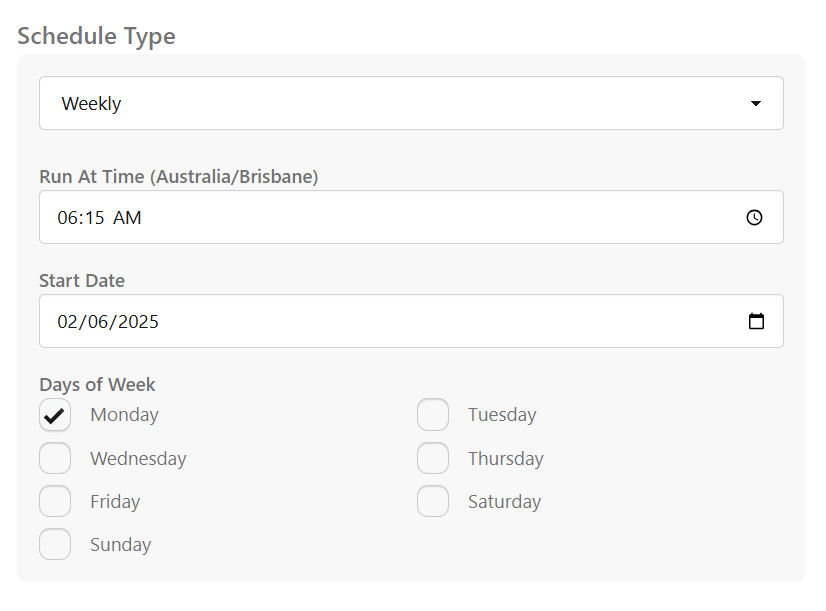
The schedule configuration section of the export creation form
One Time Only
Start Date: The specific date when the export should run
Run At Time: The specific time when the export should run
Every 15 Minutes (Growth only)
Start Date: The date from which 15-minute exports should begin
Every 30 Minutes (Scale and Growth)
Start Date: The date from which 30-minute exports should begin
Hourly
Start Date: The date from which hourly exports should begin
Daily
Start Date: The date from which daily exports should begin
Run At Time: The time each day when the export should run
Weekly
Start Date: The date from which weekly exports should begin
Run At Time: The time when the export should run on selected days
Days of Week: Select which days of the week the export should run
Monthly
Start Date: The date from which monthly exports should begin
Run At Time: The time when the export should run each month
Custom Date Ranges and Scheduling
If an export uses a Custom range (fixed start and end dates, maximum 1 year), it cannot run on a recurring schedule. SyncRange pauses the schedule automatically. Use Run now on that export.
To run daily or weekly again, edit the export and switch back to a rolling preset (for example Last 30 days). You can then set or resume a schedule from the export detail page.
This is separate from the One Time Only schedule type, which fires a single scheduled run at a chosen time. A custom date range always requires manual runs, regardless of schedule type. Some integrations also pause schedules for other manual-only ranges, such as Shopify Backup (10 years).
Schedule Best Practices
Match Frequency to Data Volume: For larger exports, select an appropriate timeframe/date range so each run can finish reliably within your chosen schedule cadence.
Consider API Limits: Some data sources have daily API quotas. Schedule exports accordingly to avoid hitting limits.
Off-Peak Hours: For large data exports, consider scheduling during off-peak hours (nights or weekends).
Data Freshness: Match your schedule to how frequently the source data updates. For example, Google Analytics data may have a 24-48 hour delay.
Time Zones: All schedules use your account's time zone setting (currently set to UTC).

 Install on Shopify